Raven Ho

Portfolio · Senior Product Designer

Psst… what’s the secret word?

My portfolio is invite-only for now. Pop in the password to take a look around.

No password? Ask me for it.

Hi, I’m Raven.

I design complex, data-heavy B2B platforms. Ask me anything about my work, or start with one of these.

AI answers based on Raven’s portfolio. They may be imperfect.

Projects
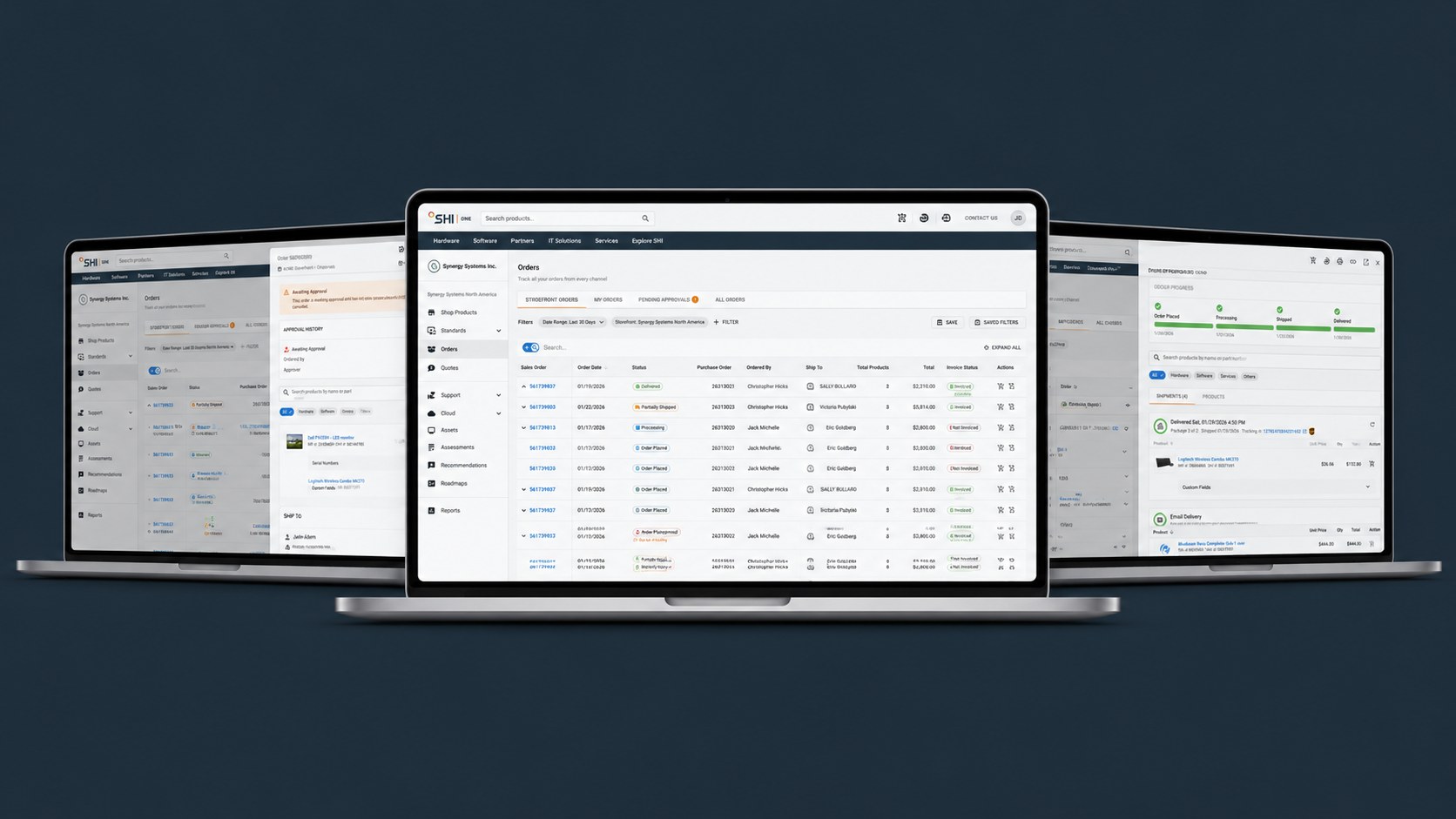
The new Orders page on laptops
Orders: one place to track, approve, and actSHI One

Track, approve, and act on orders in one place. Unique users opening order details fell from 60% to 12%.
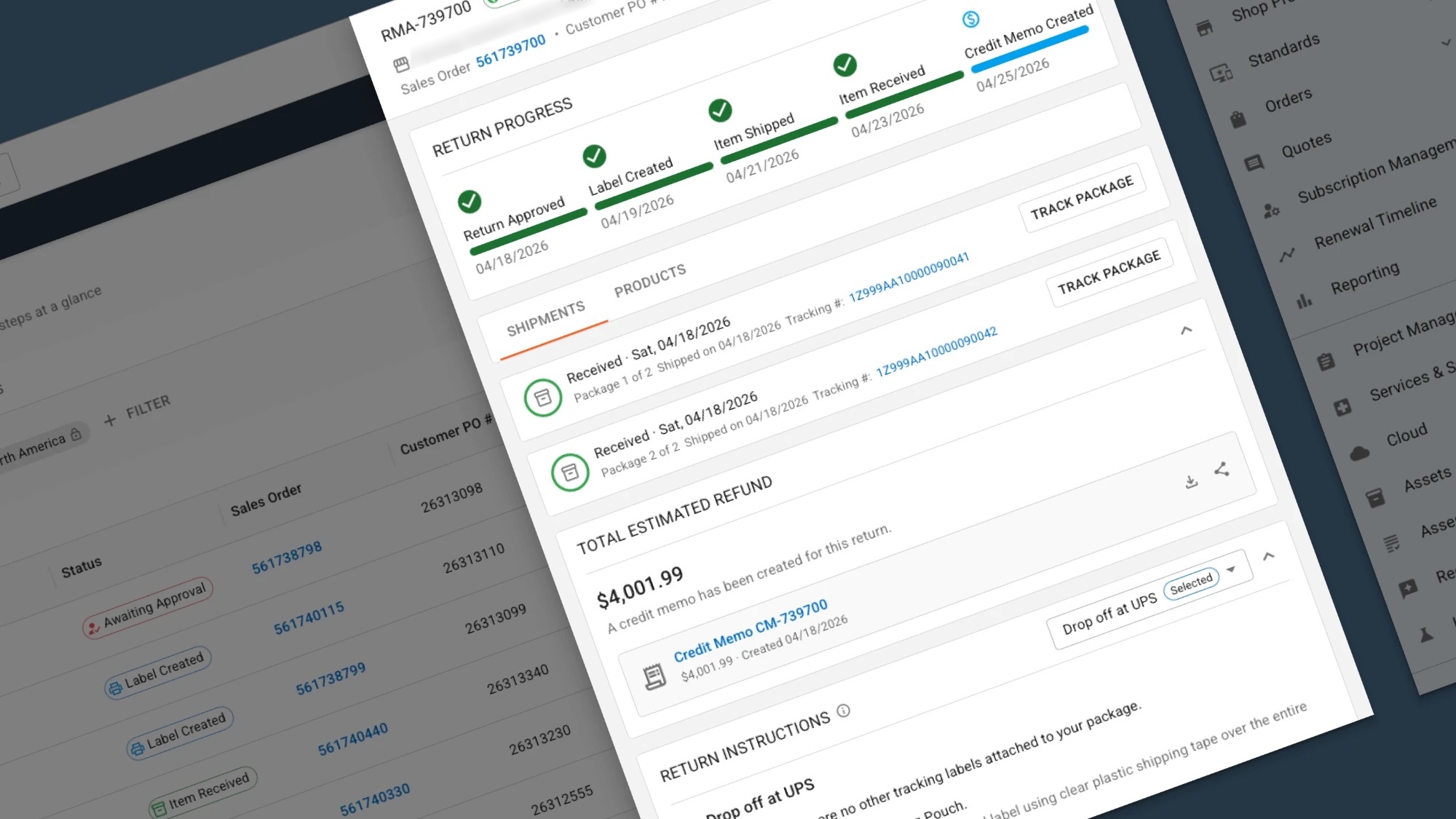
Return progress, shipments, and credit memo in the new returns experience
Returns: from email to self‑serviceSHI One

Moved return data collection from email into SHI One. The MVP released in Nov 2026.
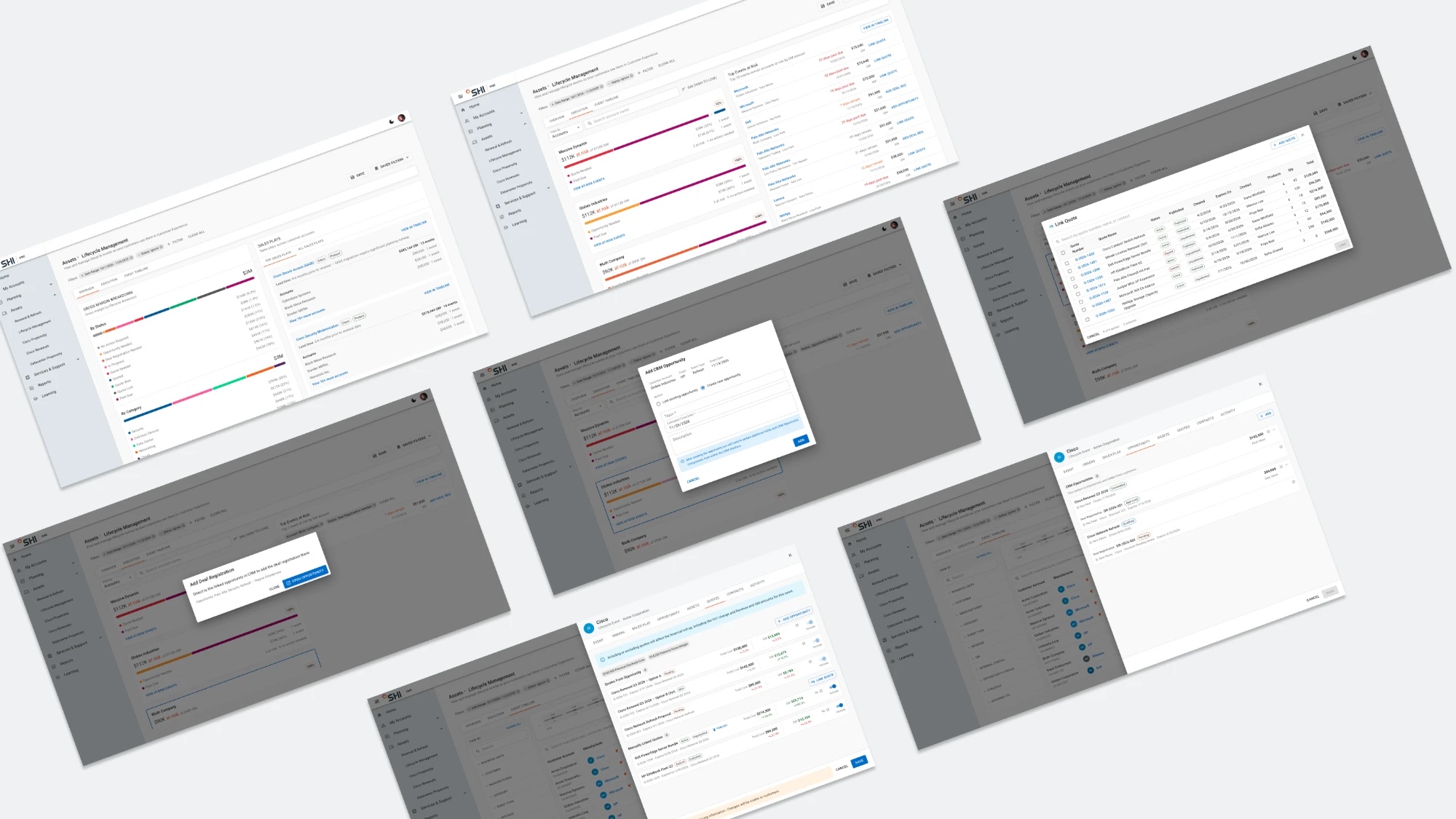
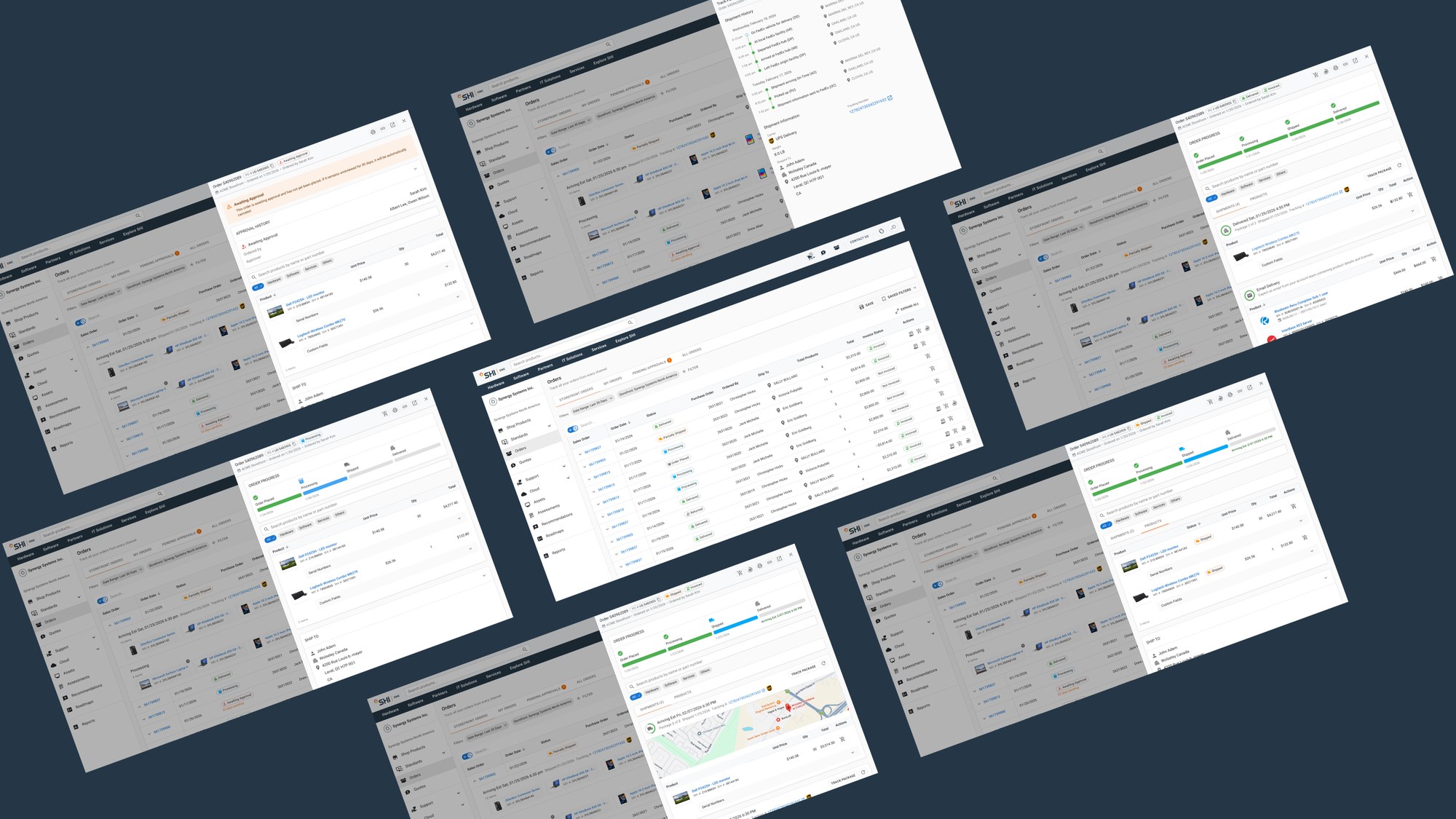
Lifecycle Management Overview, Execution, and event details screens, shown at an angle
Lifecycle management: prioritize and act on renewalsSHI One

One view for sales to manage renewals tied to multi-billion-dollar gross margin across 1,000+ customers.
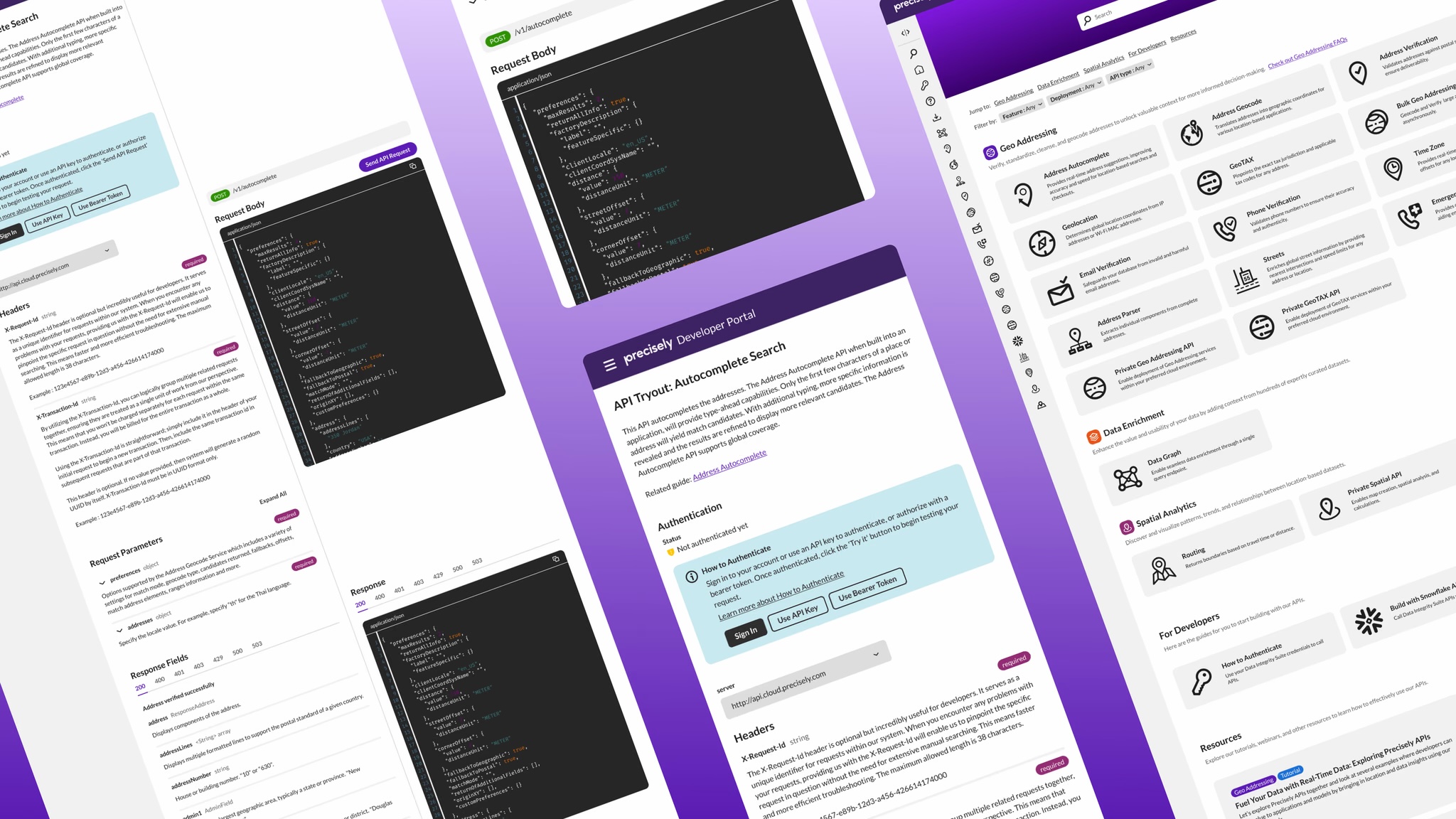
Precisely Developer Portal API tryout page shown at an angle
Developer Portal: simpler sign-in, faster API tryoutPrecisely

Redesigned API tryout and docs for 10+ APIs, with 40% less time in usability testing.

← Projects
SHI One · 2026 · Released June 2026

Orders: one place to track, approve, and act

I redesigned how SHI One customers track and manage orders, bringing 3 data systems under one clear status model.

Role
Sole designer
Team
1 PM, 3 engineers, 2 admins
Timeline
3–4 months, 2026
Scope
Status model, Orders, order details, approvals
60% → 12%Unique users opening the order details page, before vs. after
3Data systems unified under one status model
2xFaster order tracking in testing with 5 customers
ProblemOrders were hard to track and manage. Status was unclear, and large enterprise orders with split shipments couldn’t be reconciled.
What I didMapped role-based order workflows, created a new order status system, designed the new Orders and order details experience, and validated it with customers.
ResultAn MVP released in June 2026 with clear status, at-a-glance details, and inline actions. Users now rarely need to leave the Orders page.
The new Orders page on laptops

Context

SHI One connects internal account executives and customers in one shared workspace. This project covers the customer order and approval experience. Clear, self-service orders build trust, support retention, and reduce support load.

Role-based order workflow

Admins approve and manage orders across teams. Purchasers track only their own. I mapped both workflows to decide what each role sees and can do.

AdminMonitors orders across the organization
Orders placed by team members
→
Approval pendingAdmin view
→
Review & decide
ApproveDeny
Transfer approver
→
Order created in AX system
→
Continues to fulfillment
PurchaserSees only their own orders
Place order
→
Awaiting approvalPurchaser view
→
Processing
→
Track progress
Shipped
→
Delivered
Invoice status · any time after processingInvoicedNot invoiced
Before shippedCancel orderAfter deliveryRequest return
Order status overviewAwaiting approval›Approval pending›Transfer approver›Processing›Shipped›Delivered›Returned
Data Integrity

Three data systems, one interface

Built Status Model

Statuses were unclear, and large orders ship in parts. I aligned statuses to Microsoft Dynamics AX.

Surface Tracking Info

Tracking was buried in order details. I worked with engineers to surface carrier and shipping info.

Integrate Approval Process

Approvals lived in a legacy system. I interviewed internal web admins to find the fields the UI needed.

Track orders easily with new status model
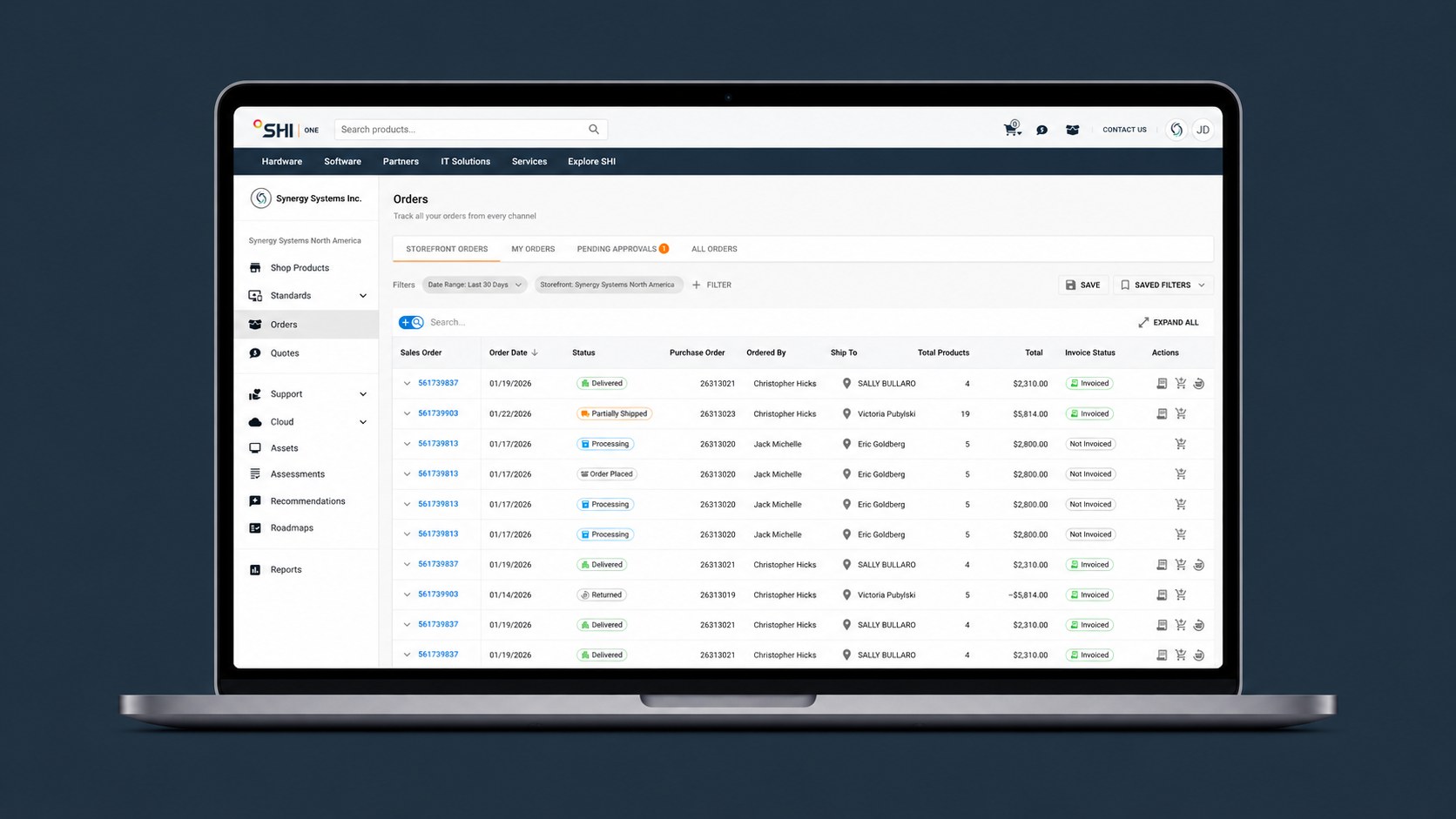
The new Orders page on a laptop
Orders page: one shared order status across 3 data systems
Order screens for approval, processing, shipped, delivered, and package tracking
Launch order details from the Orders page, with a view for each status
Admin: Approve or deny orders from Orders page
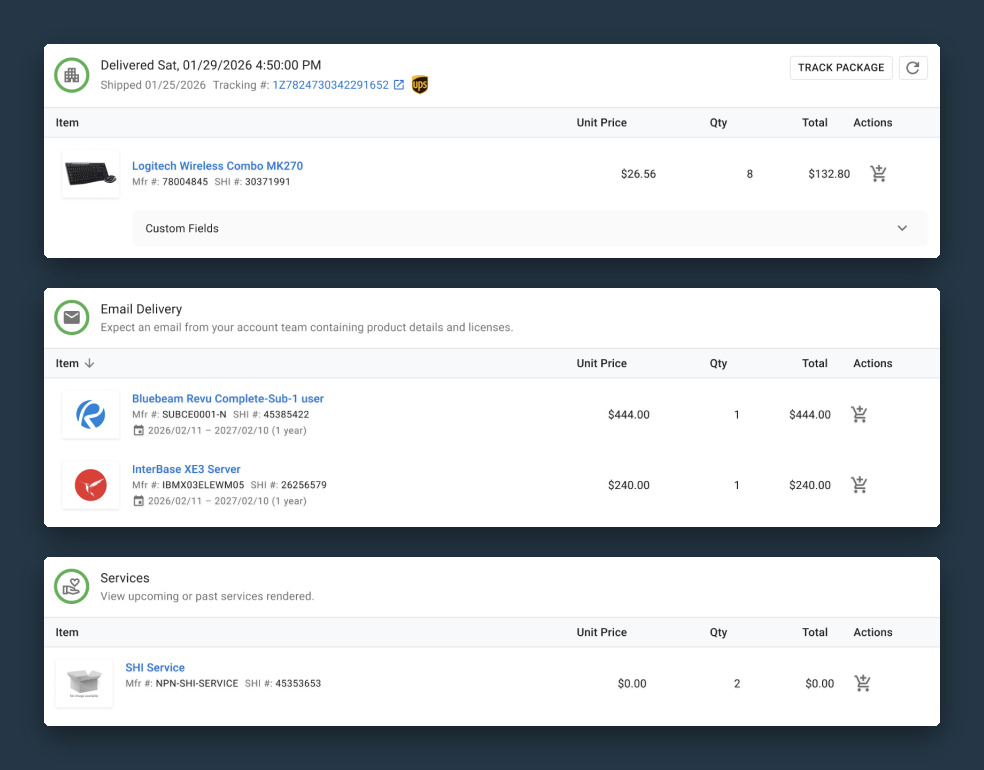
Three shipment box variants: hardware delivered physically, software and subscriptions delivered by email, and services
Challenge

Reconcile split shipments & product types

Large enterprise orders ship in parts and mix product types. Each order now shows a card for every shipment, so users can track each part on its own.

Trade-off: Showing payment status and method moved to the next phase because of technical limitations.

Outcome

60% → 12%Unique users opening the order details page2 months before release (legacy platform) vs. 2 months after (SHI One)
“The information is much clearer — I can understand where my order is without having to dig.”SHI One customer
Future

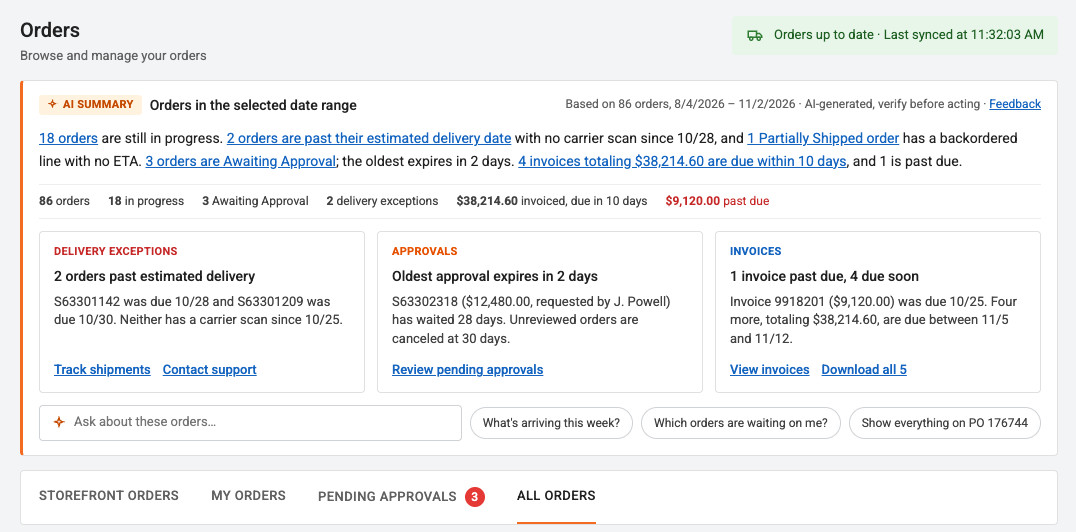
AI answers order questions

Concept: AI summary band, insight cards, and attention column on the Orders page
← Projects
SHI One · 2026 · MVP released Nov 2026

Returns: from email to self‑service

I designed a vision for managing returns inside SHI One, replacing manual emails among sales, customers, and the Return Merchandise Authorization (RMA) team, and scoped an MVP to ship first.

Role
Sole designer
Team
1 PM, 3 engineers, 5 stakeholders
Timeline
2–3 months, 2026
Scope
Return flows, prototype, MVP
3Return methods mapped into user flows
6Interviews with 3 customers, to learn needs and validate the design
Nov 2026MVP released with a new returns creation wizard
ProblemAfter a return is submitted, everything runs through email among customers, sales, and the RMA team. This causes delays and makes returns hard to track.
What I didRan 6 interviews with 3 customers, first to understand their needs and later to validate the design. Mapped user flows for 3 return methods and designed a vision prototype and an MVP for creating returns from Orders.
ResultThe MVP released in Nov 2026 with a returns creation wizard that guides users through return reasons and next steps. The rest of the vision is broken into features on the 2027 roadmap.
Return progress, shipments, and credit memo in the new returns experience
Problem

Return data collection lived in email

Customers start a return from an order in SHI One, but once they submit it, the process moves to email. Customers can’t track progress themselves, and the RMA team has to email customers through sales to collect the information it needs.

Customers Sales RMA Team Communications via email
Submit return requestProducts, reasons
Receive email confirmation
Receive labels & instructions by email
Drop off packages at UPS
Request and provide pickup time
Contact sales for Logistics pickup
Track return shipments via carrier
Receive return credits
Receive notification email
Check with RMA team
Ask customers for additional info
Send labels & instructions to customers
Provide pickup time to RMA team
Work with Logistics team to set up
Review return request
Approve
Check with sales
Provide labels & instructions to sales
Send extend request to vendors
Contact carrier to arrange the pickup
Provide credit memo (paper)
Refund processed
Deny
Close return request
Ship within 10 days If over 150 lbs If more info
is needed
No Yes If products received If nothing is shipped and the return expires If the shipment
is delayed
LegendProcess stepEmail handoff
Current process: after the request is submitted, every handoff happens over email
Requirements

Aligning customer needs with the RMA system

The first 3 of 6 customer interviews focused on pain points and needs. Together with the RMA team’s process, they shaped these requirements.

Self-service access

Customers want easy access to return labels, shipping and packaging instructions, and status.

Approval first

The RMA team and vendors must approve the return request and method before anything ships.

System alignment

Statuses, methods, and instructions must match Microsoft Dynamics AX, which the RMA team uses today.
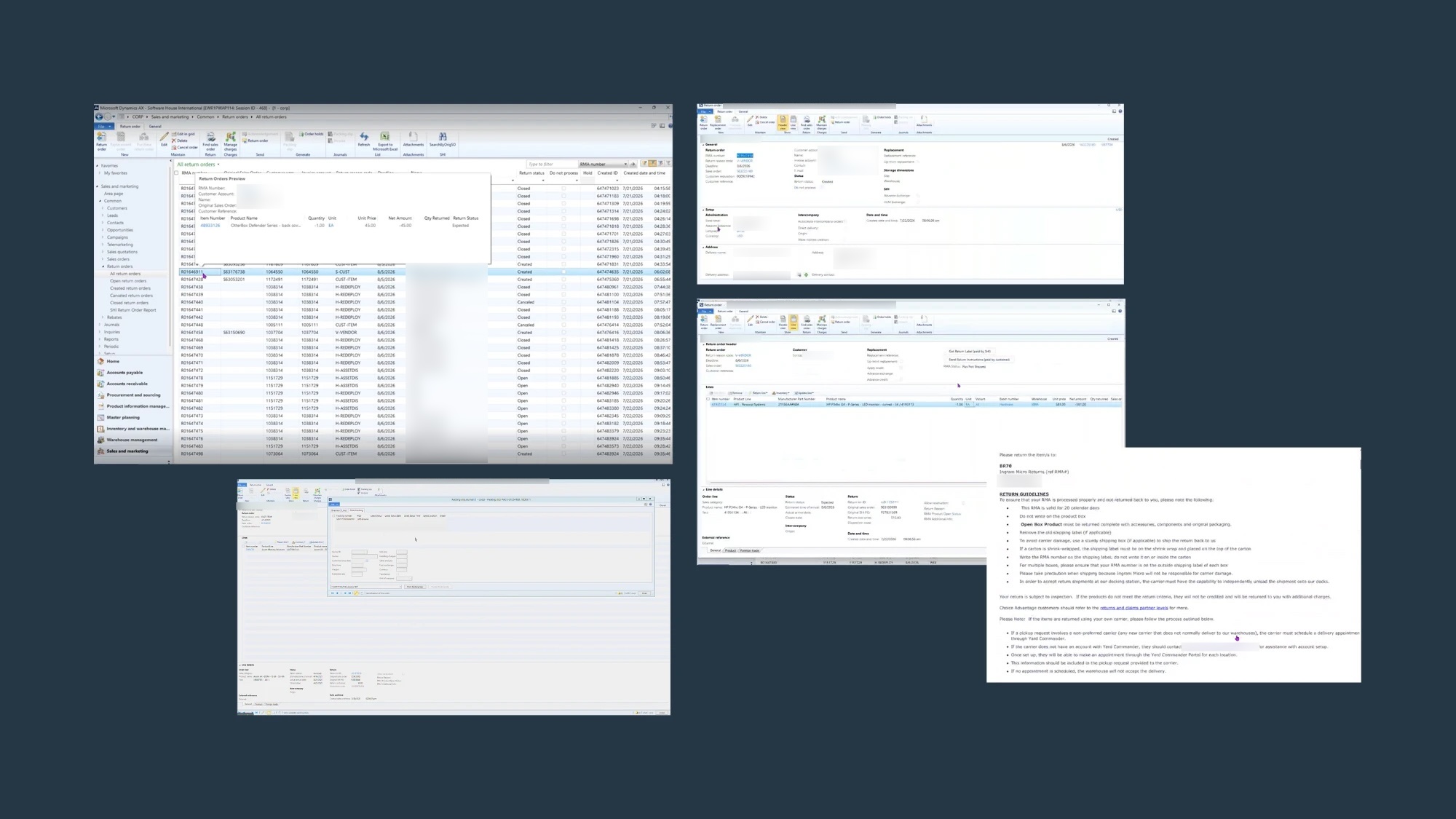
Microsoft Dynamics AX return order screens used by the RMA team, shown next to a vendor return instructions document
Align with Microsoft Dynamics AX
Vision prototype

A self-service return experience

The redesign collects essential information upfront and shows return status, actions, and communication in the UI. The goal is less email, more transparency, and a more efficient return process for customers and internal teams. The other 3 customer interviews validated the design.

Vision prototype: create a return request from the Orders page
“This is amazing. I can’t imagine how much work it’d help us reduce.”RMA team
MVP

Shipping the first slice within technical constraints

Data goes to the RMA team

Legacy systems can send collected return data only to the RMA team, not directly into Microsoft Dynamics AX.

Return details come in v2

Legacy APIs can’t link returns to their original orders, so v1 creates each return as a separate order.
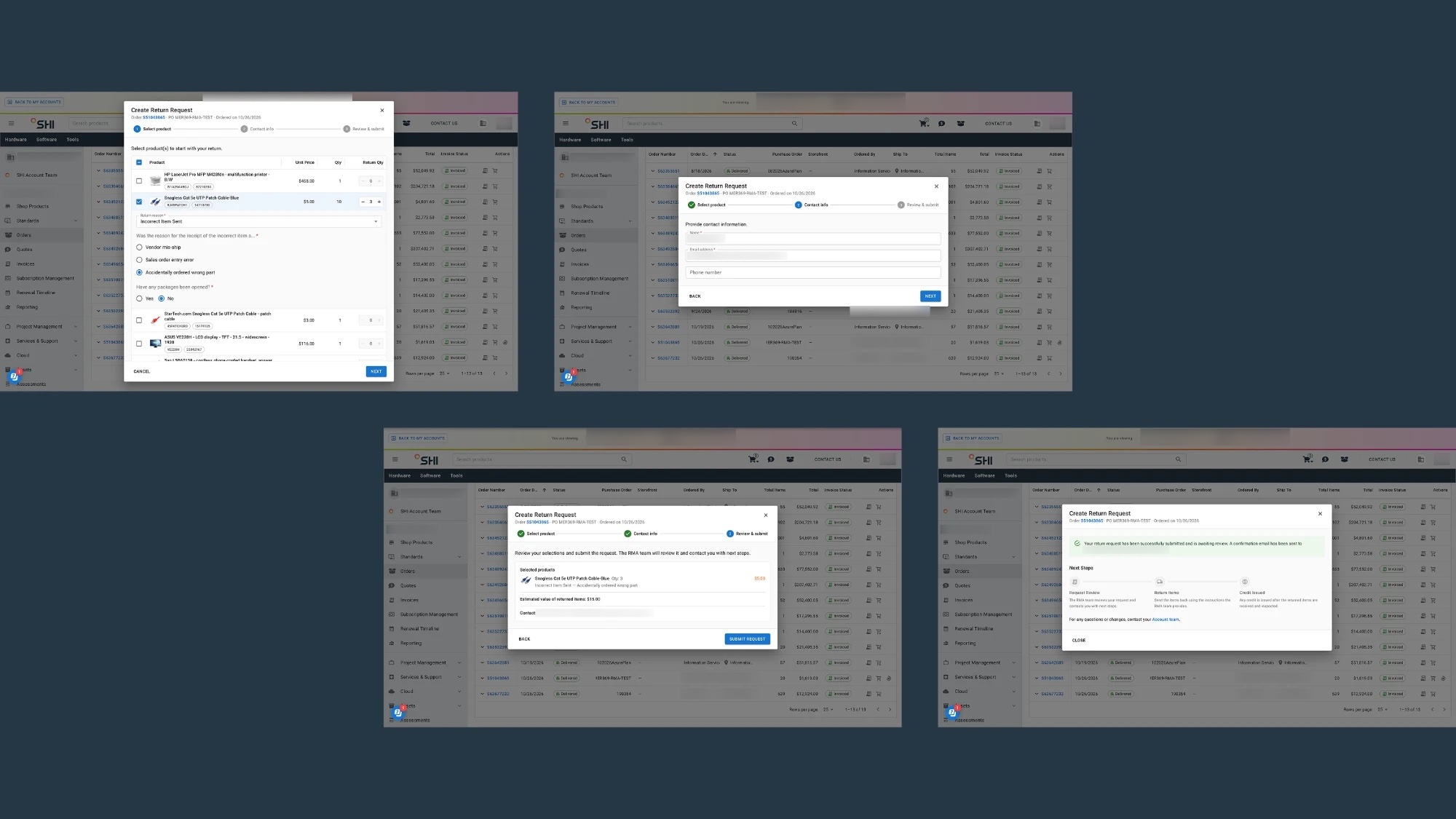
MVP returns creation wizard: select products and a return reason, enter contact info, review and submit, then a confirmation with next steps
MVP returns creation wizard. Selecting a return method is left out of the MVP.

Trade-off: v1 focuses on creating returns. The detailed view of each return moves to v2.

Outcome

Nov 2026MVP releasedNew returns creation wizard with clear return reasons and next steps

I broke the vision into features on the 2027 roadmap.

← Projects
SHI One · 2026 · Released Oct 2026

Lifecycle management: prioritize and act on renewals

I designed new Overview and Execution tabs and enriched event details with CRM and quote data, giving internal sales one place to manage renewal events.

Role
Sole designer
Team
2 PMs, 3 engineers
Timeline
2–3 months, 2026
Scope
Event details, Overview, Execution, accessible data visualization
3Systems combined in one view: SHI One, CRM, and Quote
1,000+Customers whose renewals are managed here
Oct 2026Released
ProblemRenewal data lives in 3 systems (SHI One, CRM, and Quote), so sales switch between them to complete a renewal. With thousands of upcoming events, it’s hard to judge each one’s urgency and business impact.
What I didDesigned Overview and Execution tabs for data summaries and actionable insights, added CRM and quote information to the event details drawer, and built accessibility into the data visualization.
ResultReleased in Oct 2026. Sales now manage renewals tied to multi-billion-dollar gross margin across 1,000+ customers over the next 3 years.
Lifecycle Management Overview, Execution, and event details screens, shown at an angle
Problem

Renewal data was spread across 3 systems

Sales had to move between SHI One, CRM, and Quote to complete each renewal. With thousands of events coming up, they couldn’t easily tell which ones were most urgent or had the biggest business impact.

Event details

Renewal details with CRM and quote data

To complete a renewal, sales must link it to a CRM opportunity and have at least one quote that is won and proposed to the customer. The new event details drawer brings in both, so sales can check them in one place.
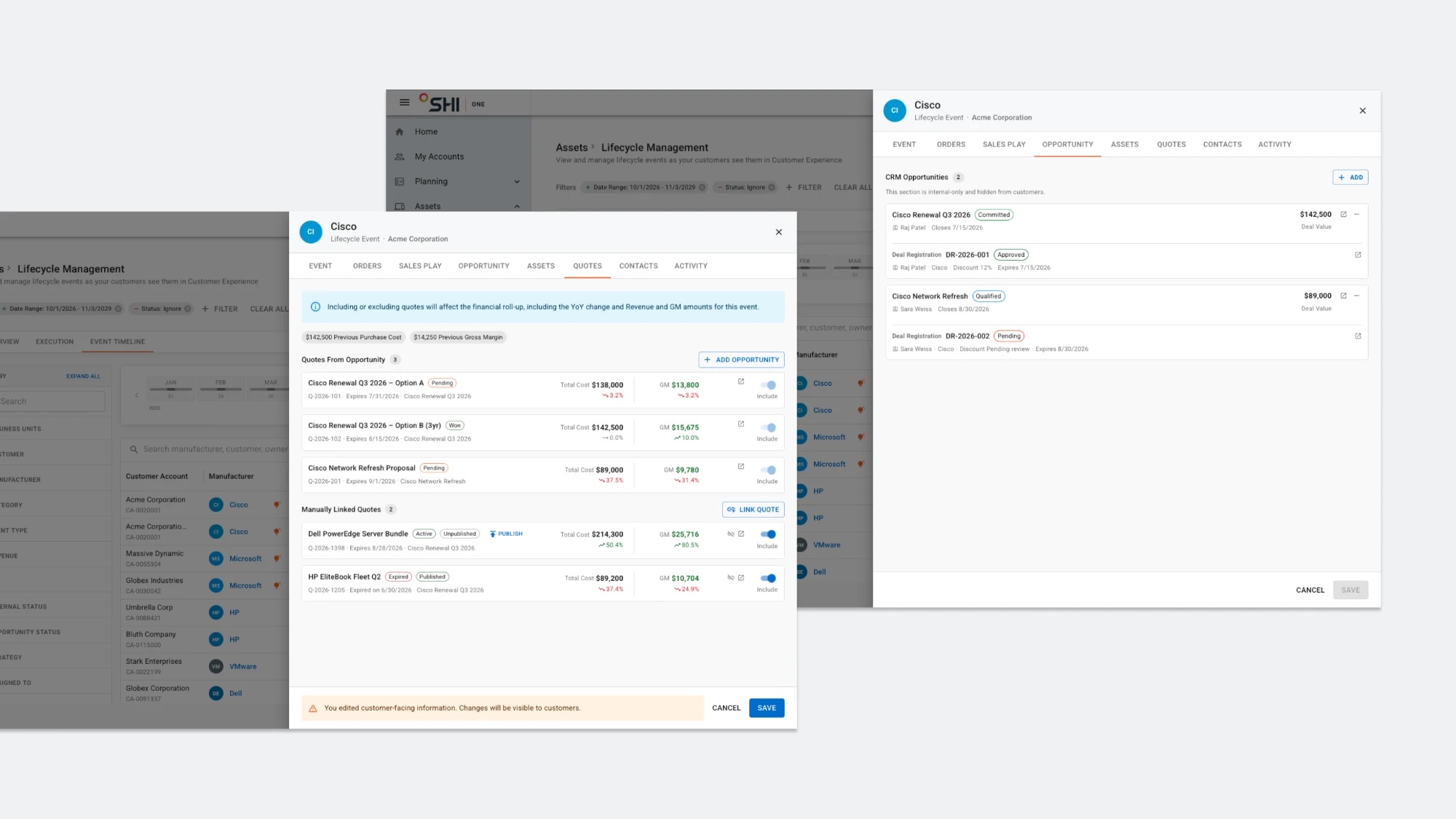
Event details drawer with CRM opportunities and quotes tabs
Event details drawer: CRM opportunities and quotes in one place
Insights

Visibility into execution performance for leadership

Two new tabs give leadership a data summary and a list of events that need action.
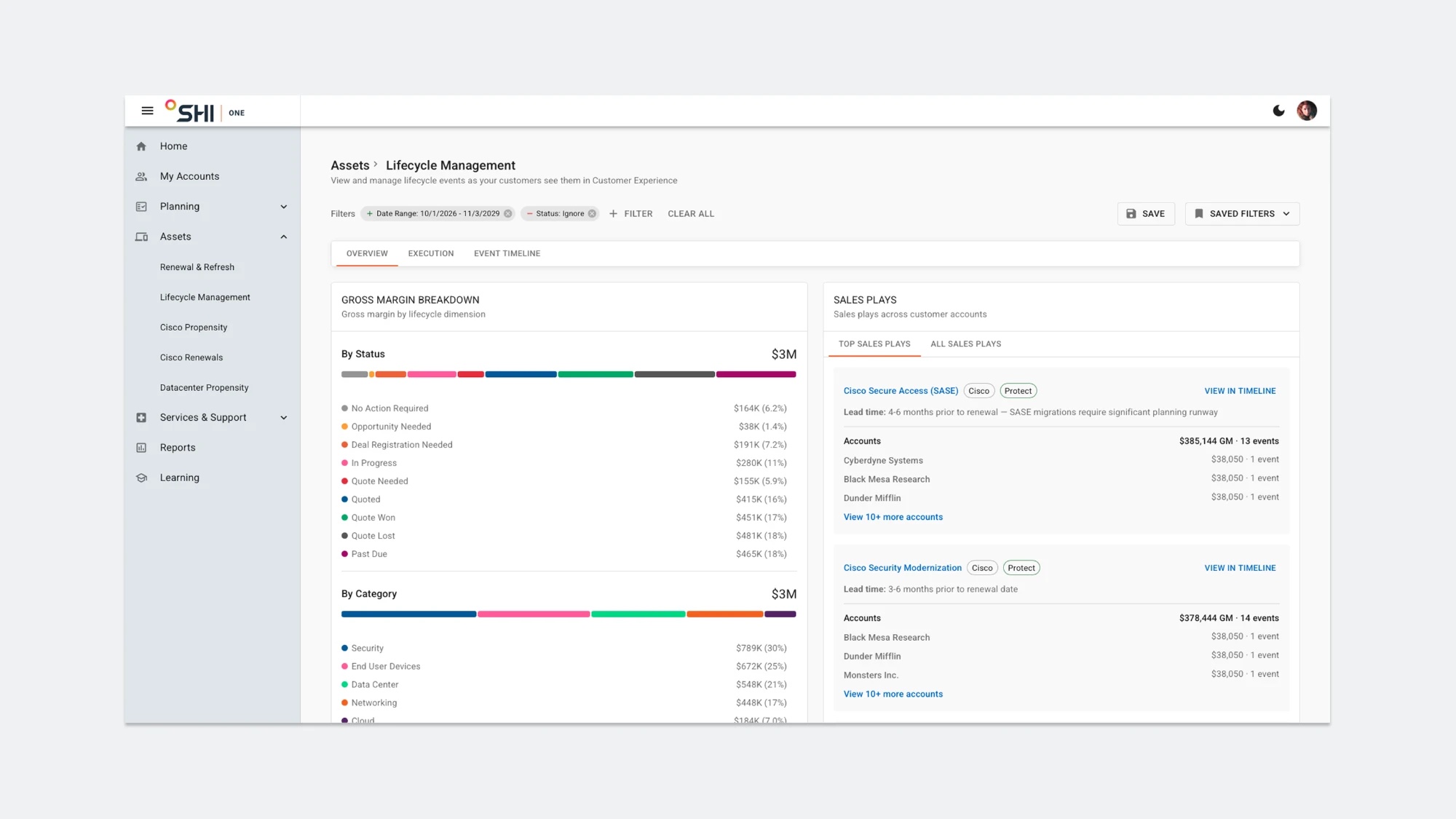
Lifecycle Management Overview tab: gross margin breakdown by status and category, with top sales plays
Overview: Identify gross margin across accounts
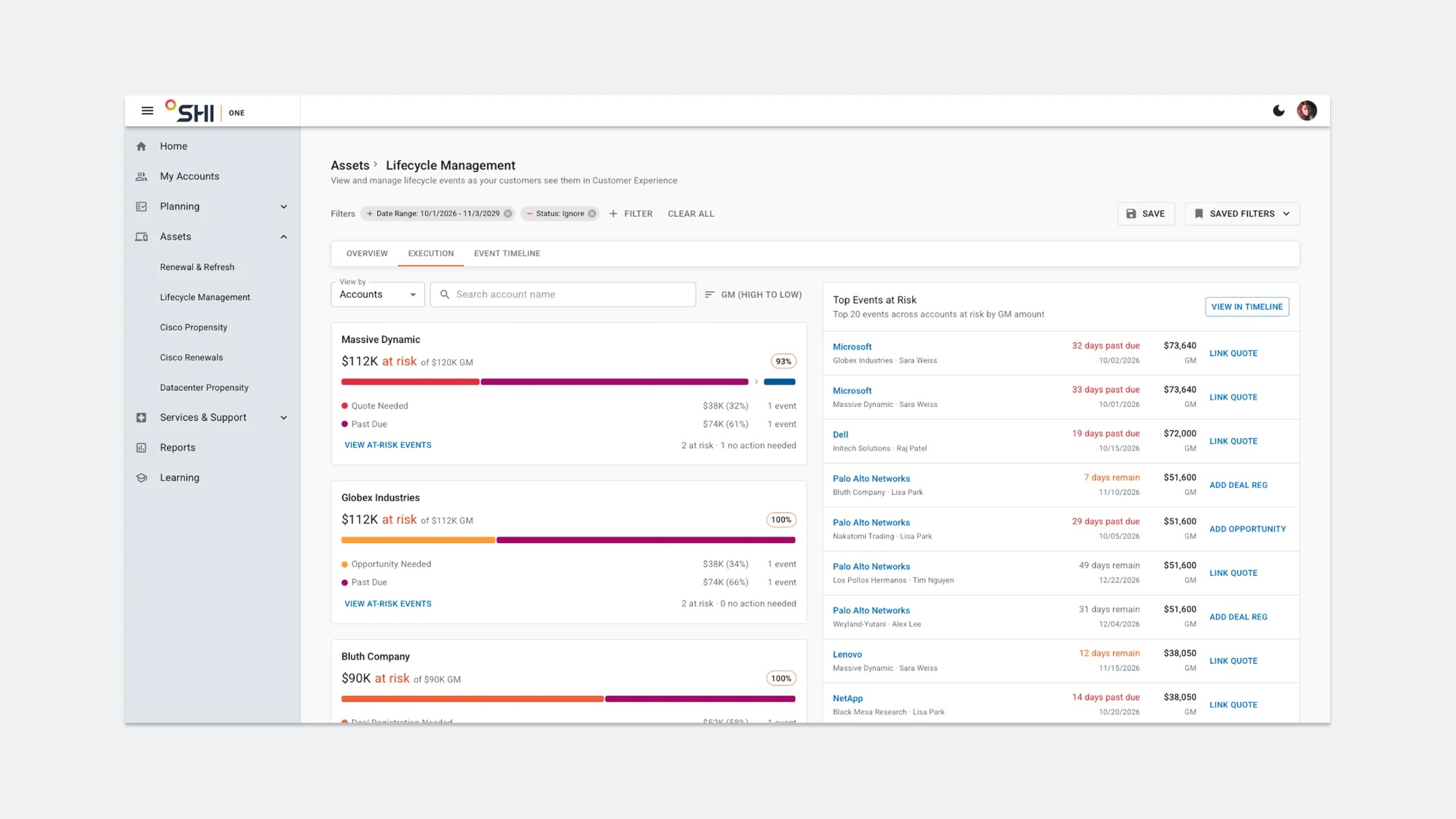
Lifecycle Management Execution tab: accounts with at-risk gross margin by status, and top events at risk
Execution: Act on at-risk events efficiently
Accessibility

Accessible data visualization

I refined the event status colors. Warning colors highlight at-risk statuses, and contrast stays accessible in both light and dark mode.
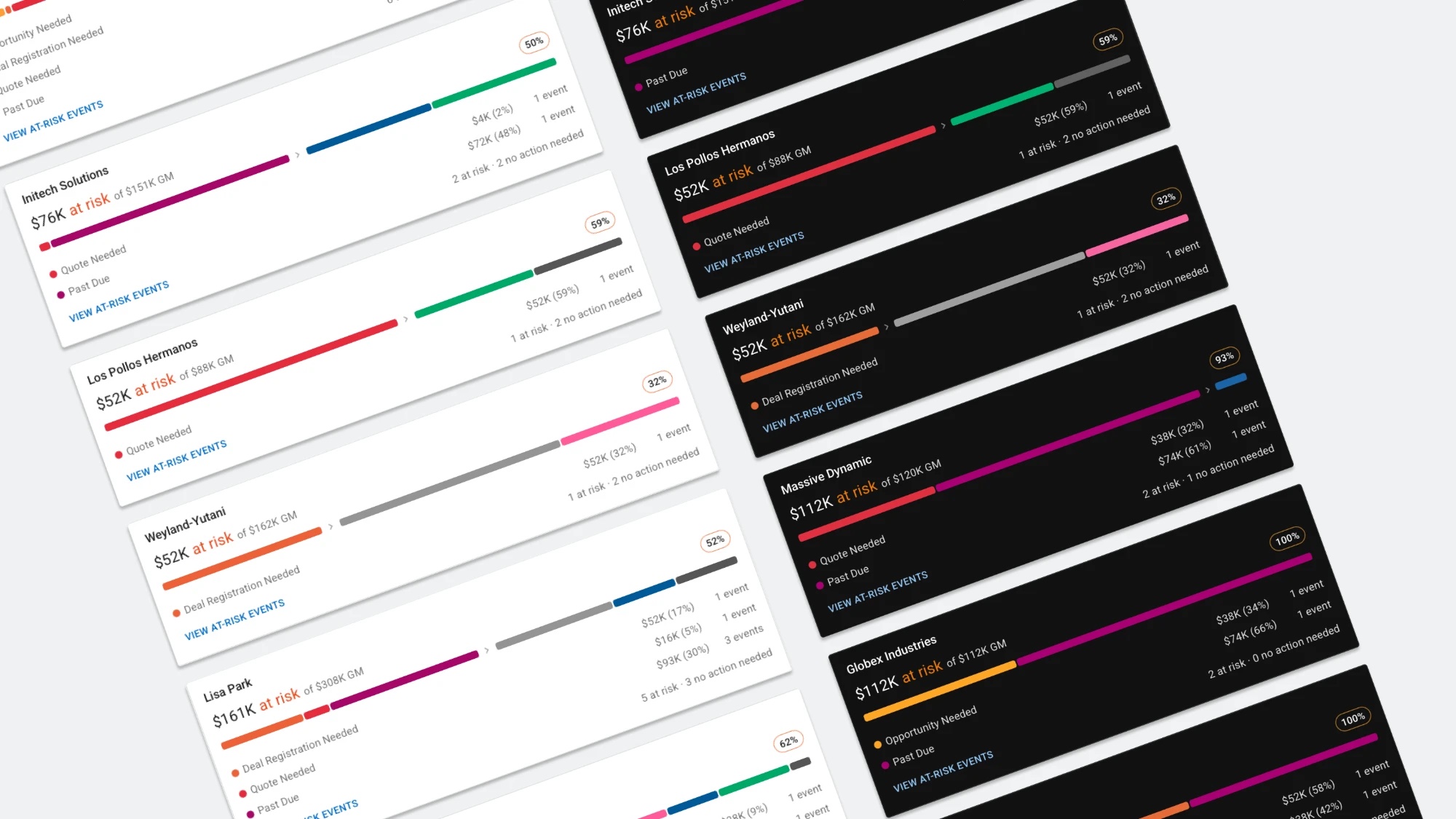
Account scorecards with color-coded at-risk statuses in light and dark mode
Status scorecards in light and dark mode

Outcome

Multi-billiondollar gross margin tied to managed renewalsOver the next 3 years
1,000+customers with renewals managed here

Released in Oct 2026.

← Projects
Precisely · 2025 · Released May 2025

Developer Portal: simpler sign-in, faster API tryout

I redesigned the API tryout experience in Precisely’s developer portal, making authentication simpler and API documentation easier to reach.

Role
Sole designer
Team
5 PMs, 6 engineers, 3 content writers
Timeline
4–5 months, 2025
Scope
Authentication, API tryout, documentation IA
40%Less time to authenticate and try out an API, in usability testing
10+APIs covered at release
5.8/7Ease-of-use score from 20 developers in usability testing
ProblemDevelopers spent around 30 minutes authenticating and trying out an API. They jumped between platforms and struggled to find the API documentation.
What I didAligned 5 PMs on a roadmap that put API testing first, redesigned the information architecture of the API testing page and documentation, and validated it in usability testing with 20 developers.
ResultReleased in May 2025 for 10+ APIs. Usability testing showed 40% less time to authenticate and try out an API.
View shipped product Precisely Developer Portal API tryout page, with request and response panels and the API catalog, shown at an angle
Context

About the Developer Portal

Precisely sells several sets of APIs, such as Address Autocomplete, Address Verification, and Address Geocode. The developer portal helps customers learn the business use cases, try out the APIs, and read the API reference documentation.

Strategy

From vision to roadmap

I worked with 5 PMs and key stakeholders to prioritize features by business impact against development effort. We put API testing first, because testing is the first step in a developer’s purchase decision and key to conversion.

Increase API adoption

Attract new potential customers and grow revenue.

Save support resources

Reduce how often users contact support while exploring and implementing APIs.

Trade-off: API testing was prioritized over multi-language support.

Focus

Make API tryout easier

We focused on simplifying authentication and API tryout, so developers can test quickly and feel confident enough to buy. Trying out an API gives them three benefits:

Rapid prototyping

Test without writing extensive code.

Early bug detection

Catch issues early in the development cycle.

Less setup

No test environments to build first.

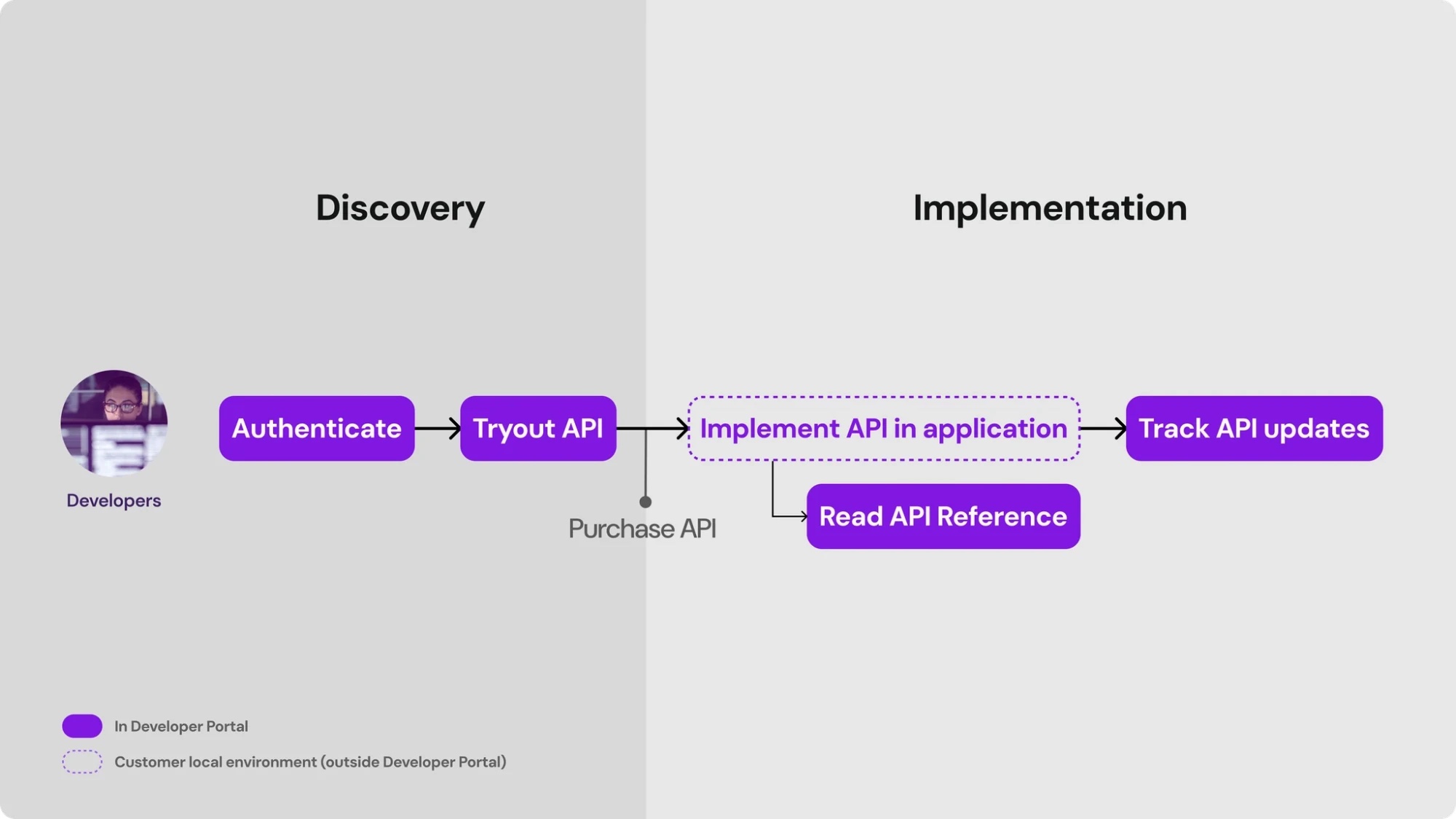
Developer journey: authenticate and try out an API in discovery, then implement the API, read the API reference, and track updates
Developer journey: the portal covers discovery and supports implementation
Problems

Where developers got stuck

Authentication meant jumping between 2 platforms
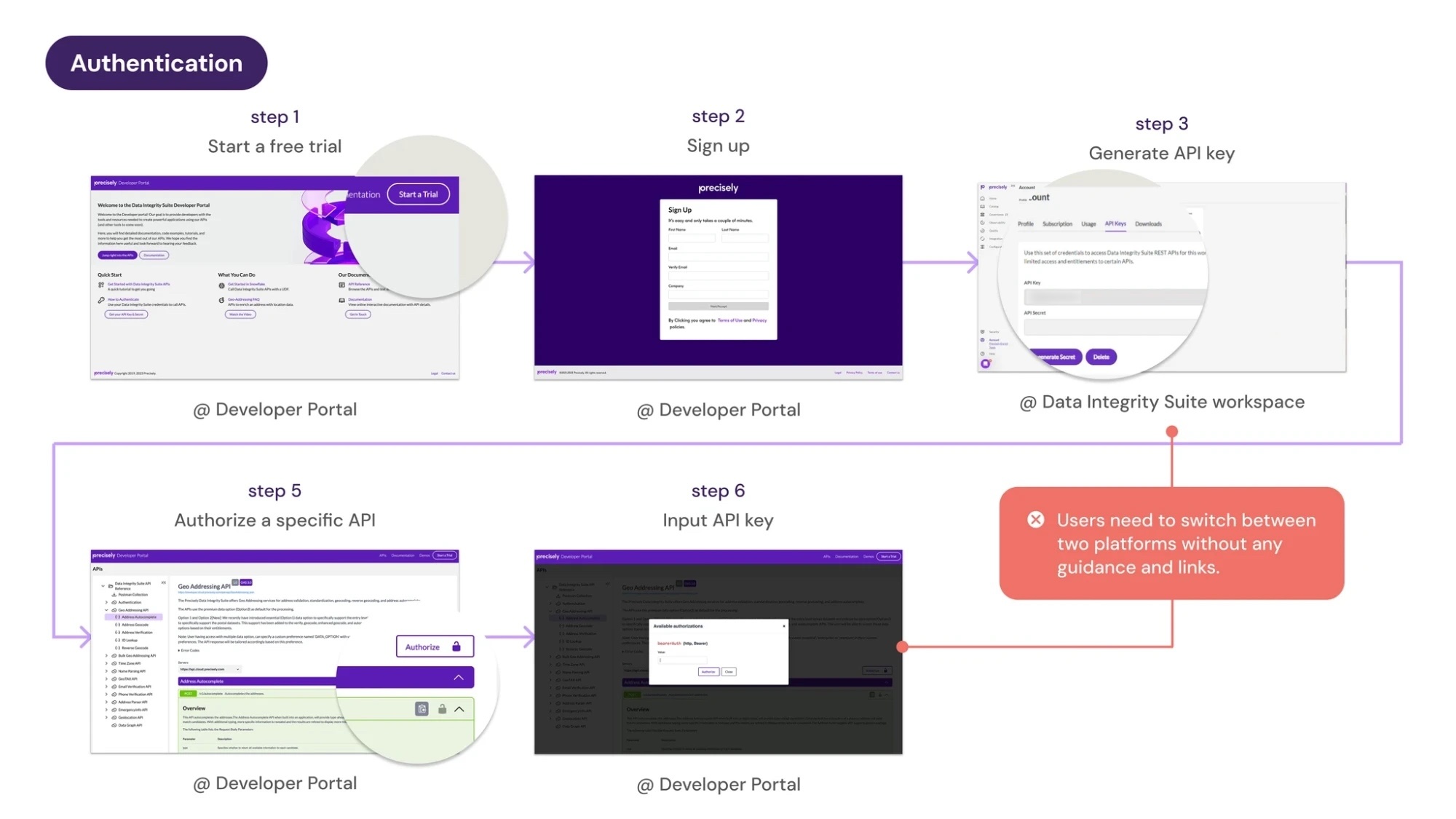
Previous authentication flow: start a free trial, sign up, generate an API key in the Data Integrity Suite workspace, then authorize a specific API and input the key in the developer portal
Previous authentication flow: users had to switch between two platforms without guidance or links

API documentation was hard to access
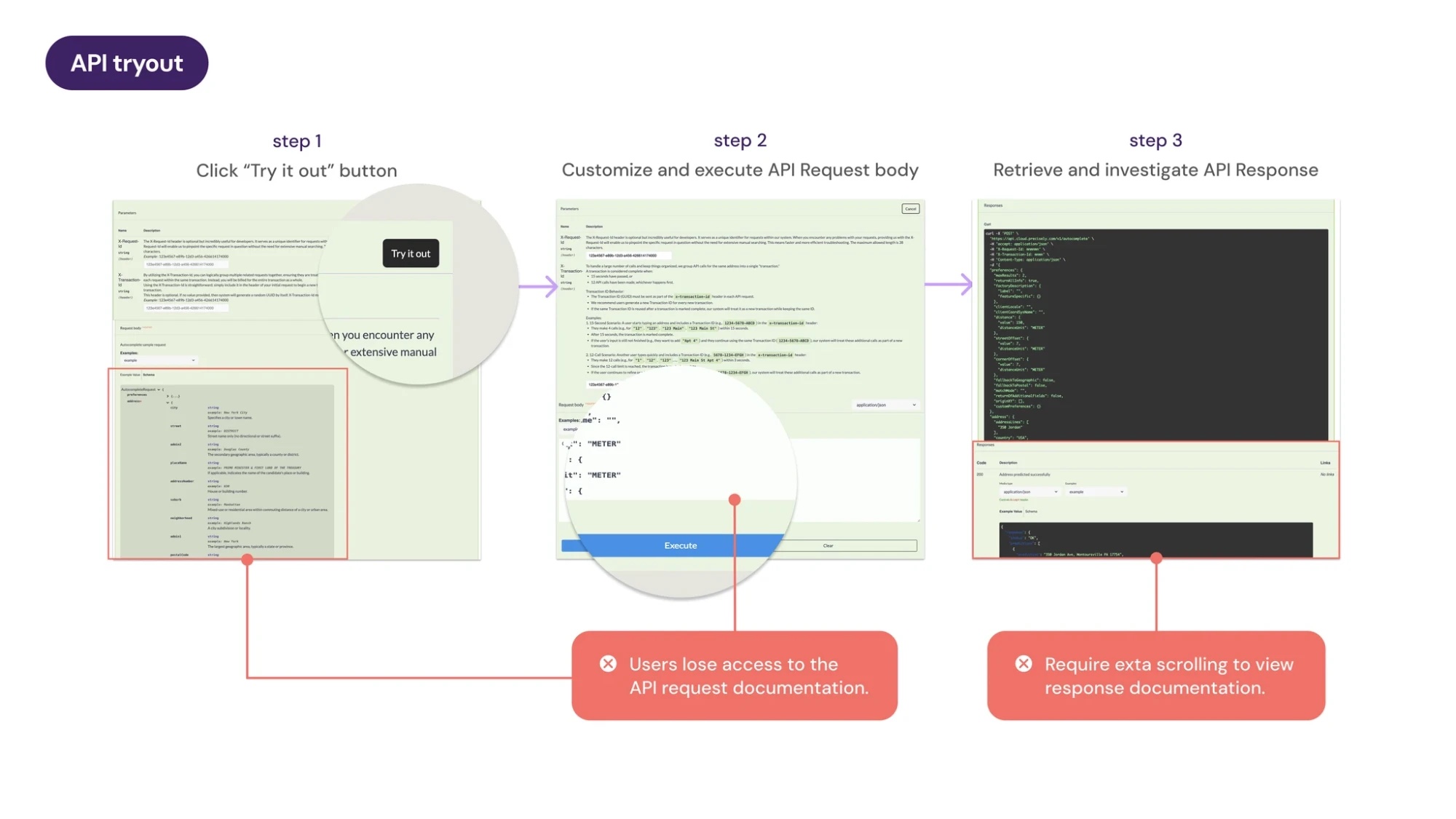
Previous API tryout in three steps: click Try it out, customize and execute the request body, and retrieve the response, with documentation lost or requiring extra scrolling
Previous API tryout: users lost access to the request documentation and had to scroll to see response documentation
Solution

Streamline authentication

A new sign-in lets users sign in and authenticate directly in the developer portal.
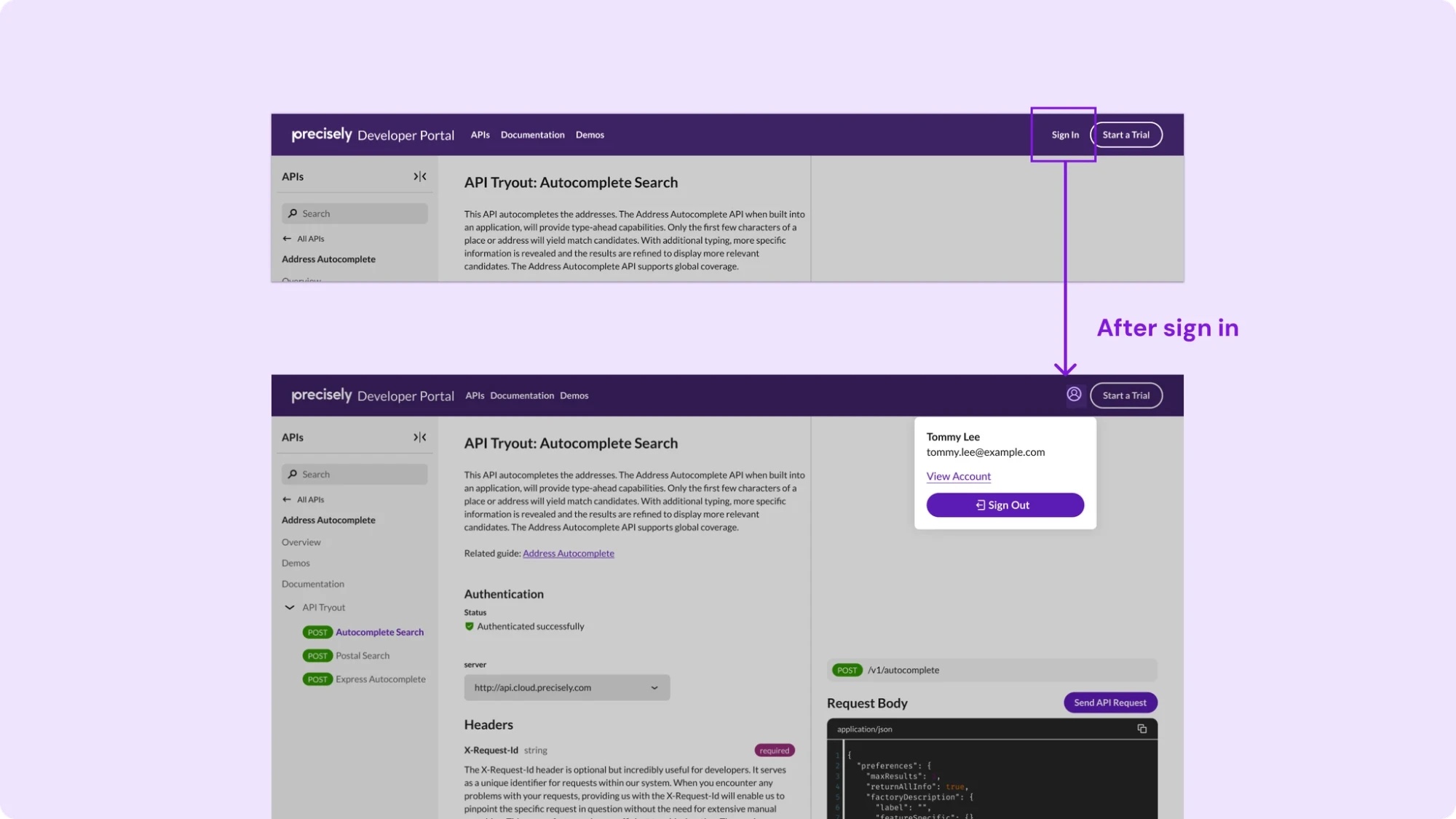
New sign-in on the API tryout page: the Sign In button, and the signed-in state with an account menu and an Authenticated successfully status
New sign-in: users authenticate directly in the developer portal
Solution

Improve the information architecture

I adopted a 2-panel layout, with documentation on the left and code panels on the right. It matches developers’ reading order and interaction flow, so they can reference the documentation more efficiently.
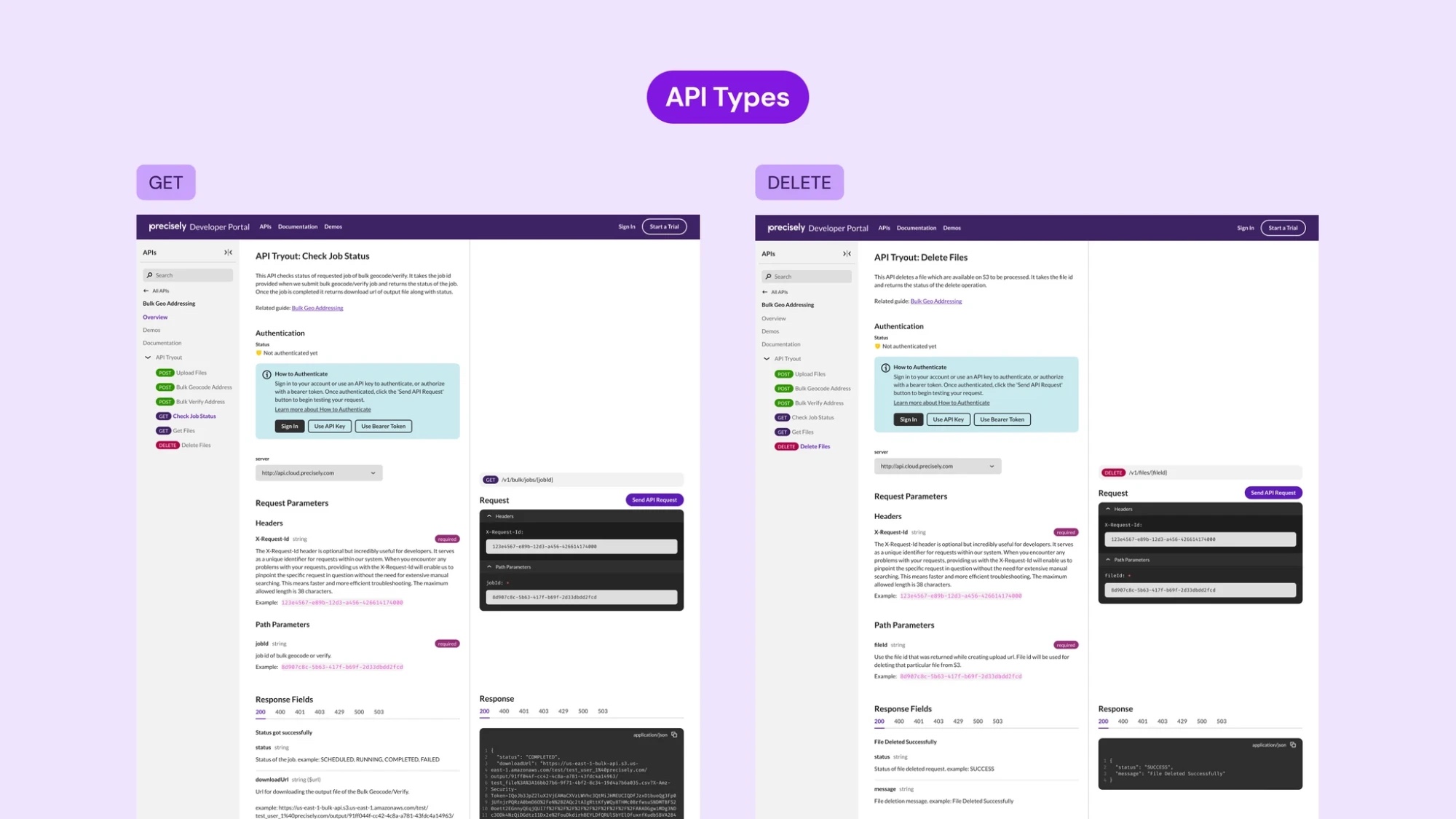
2-panel API tryout pages for a GET and a DELETE API, with documentation on the left and request and response code panels on the right
2-panel API tryout pages for GET and DELETE APIs
Validation

Usability testing with 20 developers

I ran a usability test survey in Maze with 20 developers. Maze let me collect feedback efficiently and analyze behavior through heat maps and diagrams.
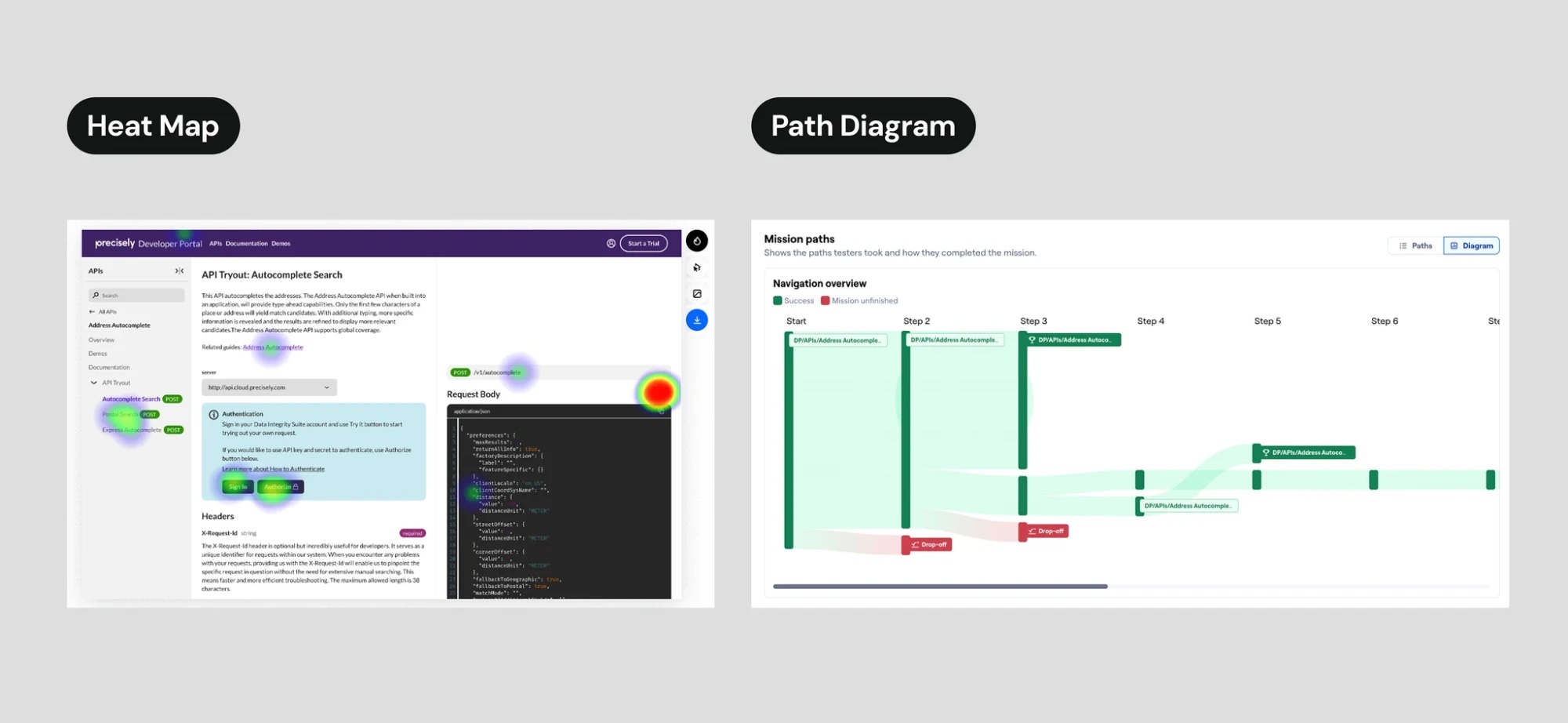
Maze results: a heat map of clicks on the API tryout page and a path diagram of how testers completed the mission
Maze results: heat map and path diagram

Outcome

Usability results were positive, and the feedback was useful.

40%Reduced time
81.8%Task success rate
5.8Ease-of-use score

20 developers. Ease of use: 1 = very difficult, 7 = very easy.
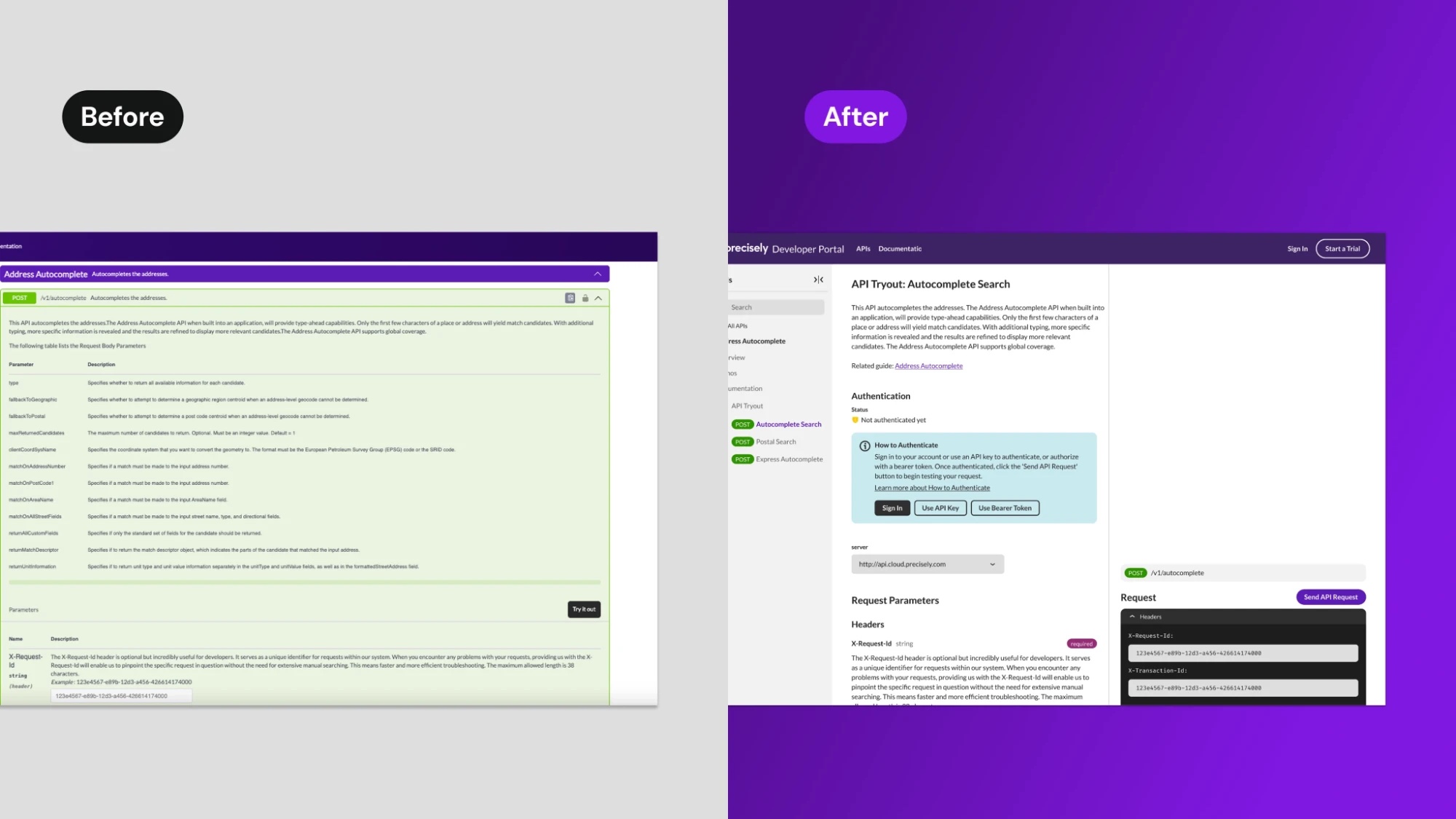
Before and after: the previous API tryout page next to the redesigned 2-panel page
Before and after: the API tryout page

Released in May 2025 for 10+ APIs. Here’s some of the feedback after release:

“I like the interactive structure of request and response body along with document information, so it’s easier to navigate and understand the parameters at the same time.”Sales engineer
“I like the new 2-panel layout API tryout page. I wish our developer portal looked like yours.”Customer
Portrait of Raven Ho

Raven Ho

Senior Product Designer

Designing for complex problems excites me.

I’m a senior product designer focused on enterprise platforms where the data is dense and the stakes are real. My degree in library and information science shapes how I organize information, and I now prototype with AI to make design intent clear to engineers.

Now
Senior Product Designer, SHI International
Before
Precisely, ASUS, UXI Design
Education
B.A. Library and Information Science, National Taiwan University
Languages
English, Mandarin
Location
Austin or remote

AI experiments

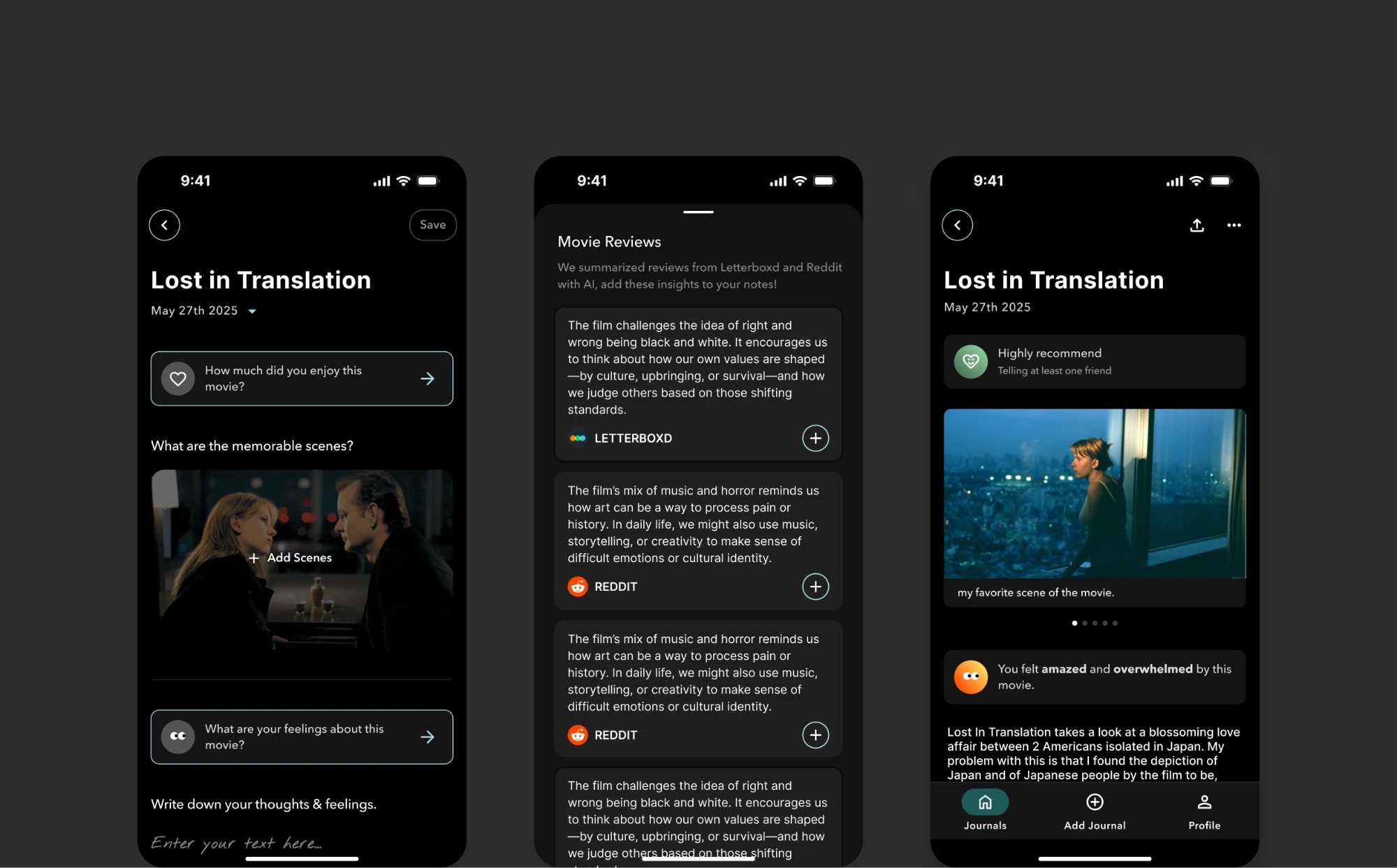
Fink movie journaling app: a journal entry for Lost in Translation, AI-summarized reviews from Letterboxd and Reddit, and a saved entry with an AI mood summary
Fink2024 – Present

A movie journaling app I designed from scratch. AI summarizes reviews from Letterboxd and Reddit, so you can add those insights to your notes.
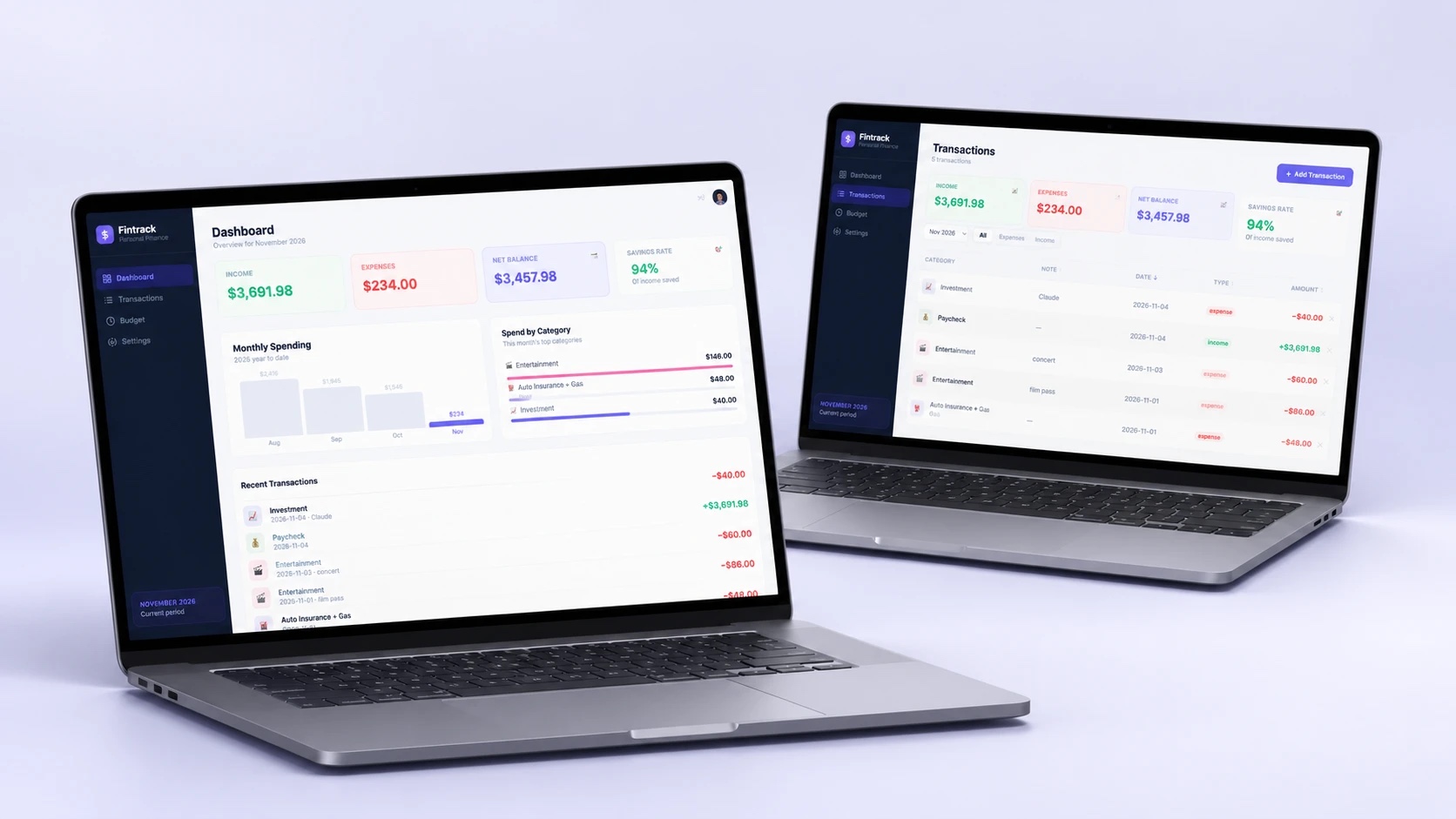
Fintrack personal finance web app: a dashboard with income, expenses, and monthly spending, and a transactions list, shown on two laptops
Fintrack2026 – Present

A personal finance tracking web app that I vibe-coded with AI, with a dashboard, transactions, and budgets.

What colleagues say

“Raven works with Product Management and Engineering and collaborates on features, UX designs, and project management to ensure the right designs are delivered. She is an example of how UX can be a key player in leading and influencing Precisely’s products.”Dennis SchmidtPrincipal UX Architect, Precisely
“Raven approached every challenge with a positive attitude, was always open to feedback, and communicated her ideas clearly and effectively. Her collaborative spirit made the entire process seamless, and her designs often exceeded our expectations. I highly recommend Raven to any team looking for a UX designer who combines technical expertise with a deep understanding of user needs.”Neha SondhiSenior Product Manager, Precisely